
After so many years of players mastering build mechanics, the skill gap between the veterans and newcomers has increased so much that it’s completely overwhelming for newbies. This guide on how to build in Fortnite is here to help you level the field. We’ll break down Fortnite building from the very basics, starting with core concepts and moving into advanced techniques. You will learn how to build efficiently, how to think while building, and how to adapt your approach on console and mobile. No matter your platform or skill level, this guide will help you build better and win more fights.
Missed out on some of the currently unavailable skins? You can buy Fortnite accounts on Playhub and get your hands on entire collections of outfits that will never return. Secure delivery from verified sellers and best prices with every order.
The Core Building Pieces Explained
Every Fortnite structure is built from four primary pieces. Understanding how and when to use each one is the foundation of good building.
-
Walls are your primary layer of defense. They block bullets, deny enemy vision, and give you time to aim and reset your health.
-
Ramps are your primary movement tool. They let you gain height, create elevated peeking angles, and push opponents without exposing yourself fully.
-
Floors connect your builds, prevent fall damage, and allow horizontal movement.
-
Cones block enemy movement, interrupt enemy edits, and control space inside boxes. Advanced players rely on cones to shut down aggressive pushes.
Learning how these pieces interact is crucial. If you don’t know how to practice building in Fortnite, go to the custom modes focused no building is best when learning Having strong fundamentals makes everything else easier.

Editing As a Combat Skill
Good editing separates mediocre builders from the great ones. Well-executed edits alow you to finish your enemies off without taking any damage.
-
A wall edit can create an advantageous firing angle.
-
A floor edit can become an escape route or create an unexpected firing angle on your opp.
-
A cone edit can surprise an opponent who thinks they have you boxed.
Good editing is both about speed and your ability to edit right at the right moment. Many fights are lost because players edit when they should reset, or reset when they should push. Remember to always right-shoulder peek, as it’s highly beneficial in Fortnite’s 3rd-person reality.
Essential Fortnite Building Techniques
Certain build patterns appear in nearly every Pro match. Learning them early gives you a reliable toolkit for most situations. These moves can look complicated at first, but practice them in custom modes just a little bit and you’ll realise that they are actually simple. Here are the most essential Fortnite building techniques:
-
Boxing up is the most important defensive skill. A proper box includes four walls, a floor, and either a cone or a ramp inside. This structure protects you while allowing quick edits to escape or counterattack.
-
Ramp protection is another key pattern. When pushing forward, place a ramp, then add a wall in front and to the sides. This quick build provides both protection and an elevated position for you to fire from.
-
Vertical 90-degree quick builds rely on stacking ramps with walls and floors. This pattern keeps you safe while moving upward and prevents opponents from shooting out your builds easily.
Practice these patterns until they feel automatic. They form the backbone of both casual and competitive play.
Understanding High Ground Control
Always looking to gain the high ground is among the most effective Fortnite building tips. You’ll see it again and again in Pro players' replays - they fight for elevation constantly, and whoever gains it usually wins. From above, you see more, control angles, and pressure safely since you are harder to shoot at. Taking high ground does not always mean racing upward - oftentimes it means denying your opponent the ability to take it themselves.
When you lose high ground, just reset the fight. Box up, heal, and look for a controlled retake. High ground battles are about patience and not taking unfavourable fights just as much as build speed.
Material Management Matters
Building skill means nothing if you run out of materials. You should gather and track your resources meticulously.
-
Do not overbuild when a simple wall or ramp will do.
-
Consider breaking enemy builds to regain materials during fights or even afterwards if you are low on mats.
Late-game fights punish players who waste too many materials early. Many endgame losses come from running out of mats.
How to Build in Fortnite on XBOX, PS5, and Switch
Building on a console requires a different mindset than PC. Controller limitations mean efficiency, and finding a comfortable sweet spot can be hard. Most high-level console players use the Builder Pro controller layout preset or a custom variation that keeps build pieces mapped to triggers and bumpers. This allows faster piece placement without sacrificing movement control. Here are the main principles you should keep in mind when learning how to build in Fortnite on XBOX, PS5, and Switch:
-
Sensitivity settings are crucial. Higher speed sensitivity helps with fast builds, while lower aim sensitivity keeps your shots accurate. Finding the right balance takes practice.
-
Turbo building should always be enabled. Holding buttons to place continuous builds is essential for box fights and defensive play.
-
Console builders perform best when they stick to simpler builds.
Building on a console is different from PC. You don’t have a mouse and keyboard, so your approach must emphasize precision and comfort.
Fortnite Turbo Build Setting
On console, Turbo Build is your best friend. It lets you hold a button and place multiple builds quickly. This setting is great to use both on consoles and on PC when learning how to build in Fortnite with a PS5 controller or any other controller alternative. If you are not yet used to the older build flow, stick with the Turbo Building. But remember: building fast only gets you so far. Gain a deeper understanding of the build fundamentals to utilize the Turbo Build option best.
Fortnite Building Tips for Mobile Players
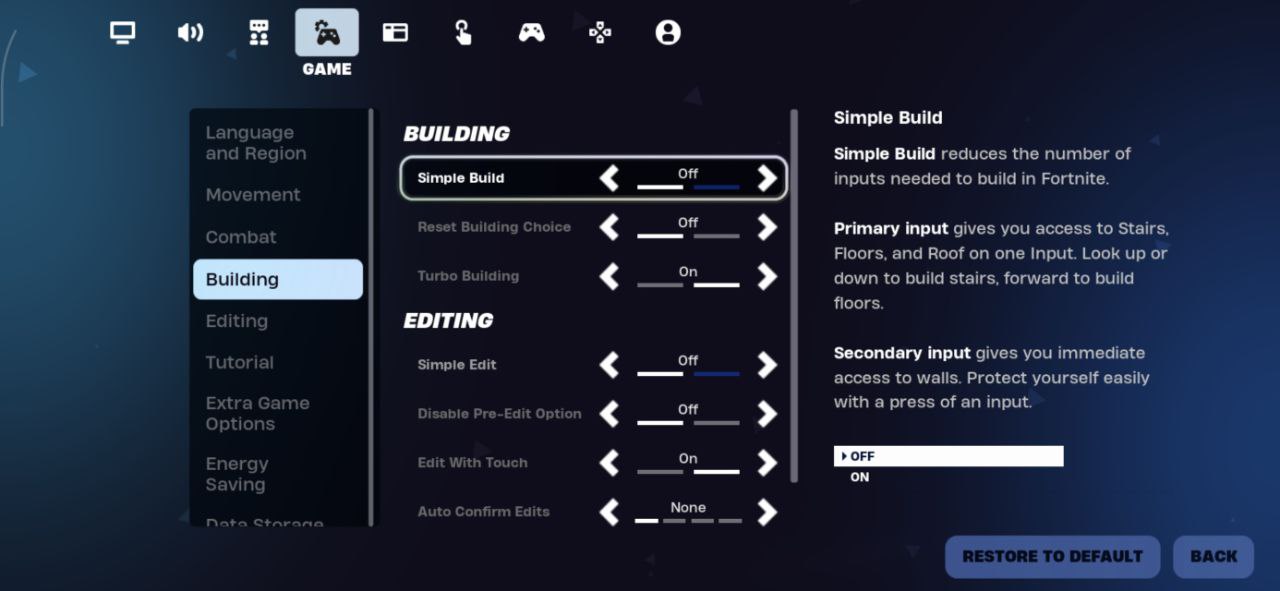
Mobile players face unique challenges, but Fortnite’s mobile controls offer surprising flexibility when set up and used correctly. The primary Fortnite building tips for mobile players are:
-
Choosing the right HUD layout is critical. Build buttons should be easily reachable without blocking vision. The Edit and Confirm buttons should sit close together for the quickest access.
-
Auto fire and tap anywhere shooting settings can reduce finger strain and let you focus on movement and builds. Many strong mobile players rely on these settings.
-
Mobile building rewards precision over speed. Just like console players, you should try to stay as minimalistic with your builds as possible.
-
Creative mode practice is essential for mobile players. Slow repetition builds muscle memory faster than jumping straight into matches.
You’re working with touch controls and very limited screen space. But with smart settings and practice, mobile builders can match players on other platforms.
How to Get Better at Building in Fortnite
Improving at building requires focused practice. Here’s how to get better at building in Fortnite quickly:
-
Warm up every day with simple build patterns - practice edits and 1v1s in custom modes. When comfortable with simpler boxes, move on to harder and harder elements and build styles.
-
Record gameplay and review fights. Ask yourself what build decision led to the outcome. Losing piece control, losing high-round, missing shots - find whatever it is leading to your losses.
Consistency in daily practice is the key to fast improvement.