
Best Controller Settings for ARC Raiders TL;DR
-
Use the Practice Range first. Do not test new settings in real raids.
-
Follow the tuning order: deadzones, response curve, look sensitivity, zoom and optic sensitivity, then binds.
-
Start with a linear response curve. Try exponential only if linear feels too twitchy.
-
Keep horizontal sensitivity higher than vertical. The screen is wider than it is tall.
-
Turn Aim Boost off to avoid jumpy tracking.
-
Use this baseline for most players: vibration off, 70–80 horizontal, 55–65 vertical, 35%–45% zoom, 45%–55% scoped, 90%–100% aim assist.
-
Consider stick-click movement binds for better aim while moving: jump on R3, crouch, and slide on L3.
Target-farming weapon and attachments Blueprints could take you upwards of hundreds of hours. To save lots of time, you can always buy ARC Raiders Blueprints on Playhub. Secure and fast delivery from verified sellers only.
How to Find Your Personal Best ARC Raiders Controller Settings
Before we jump into the recommended settings table, make sure to hop in Practice Range. Simply changing the settings on a whim in Speranza without proper settings might result in you losing your loot Topside, I’m speaking from experience here. Here’s the recommended testing order when finding your best ARC Raiders controller settings:
- Step 1: Deadzones
You know the drill - the higher the value, the harder you’ll have to push the sticks. This setting is up to your preference, so pick the value that feels best. One of my controllers is a bit drifty, so I prefer to up the value a bit; 10 feels smooth in my experience. - Step 2: Response curve
Another setting that’s hard to standardise for everyone. Linear is the one most players prefer, but exponential could work well if you prefer to really have to push your sticks to get the most accurate response. Test it out - that’s what the practice range is for. - Step 3: Look sensitivity
Your screen is wide, so horizontal should always have a higher value. You can either tweak values to match your screen’s aspect ratio - that’ll feel smooth, or go with personalized settings you feel are better. - Step 4: Zoom and Optic sensitivity
Bring your favorite gun and see how accurate your aim feels; then tweak from there. Try to ADS shoot a wall while controlling your spray - if it feels horizontally jumpy, increase horizontal sens value, if it goes sideways, you guessed it. Bring Osprey with you, too, to see how the scoped gameplay feels. Testing everything for yourself is the best way to find the best aim settings in ARC Raiders. - Step 5: Binds changes
There, everything is up to your preference. If a button feels out of place - change it. The setting I value the most is Hold X to reload.
After changing values, test it out for a couple of minutes in the range, then head out in the real raids. With goop on the line, it’s best to feel confident with your new settings. Speaking of which, you can check out our detailed ARC Raiders settings guide, covering broader topics such as display configs and graphics presets.
ARC Raiders Top Controller Settings Baseline
With how big ARC Raider’s playerbase is, some consensus on what the best settings are has formed. Here’s a reliable ARC Raiders top controller settings baseline that works for most players on a standard controller grip:
|
Setting |
Recommended value |
|---|---|
|
Vibration |
Off |
|
Horizontal look sensitivity |
70–80 |
|
Vertical look sensitivity |
55–65 |
|
Zoom sensitivity multiplier |
35%–45% |
|
Scoped sensitivity multiplier |
45%–55% |
|
Aim assist strength |
90%–100% (then adjust if it feels sticky) |
|
Look response curve |
Linear |
|
Aim boost |
Off or very low |
|
Left stick deadzone (movement) |
8%–12% |
|
Right stick deadzone (aim) |
4%–8% |
Many players, especially those using DualSense controllers, may experience stick drift. If your crosshair moves on its own when you release the stick, raise the right-stick deadzone by 1–2% and see how it goes.
Best ARC Raiders Controller Keybinds
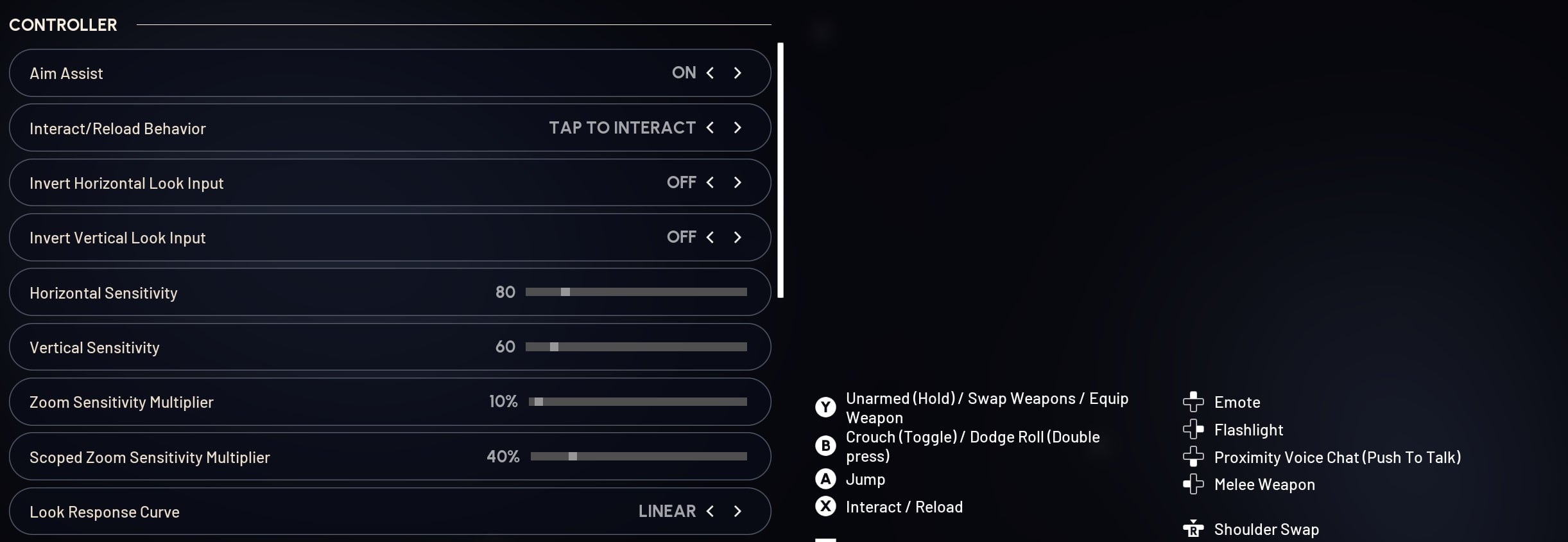
With aiming out of the way, it’s time to pay attention to the movement. The best ARC Raiders controller keybinds are those that let you press every button smoothly, placing important buttons on easily reachable keybinds and relegating less important ones to secondary buttons such as the DPad and paddles, if you have them. While this settings section is very personal for every player, there is a config considered to be a sweet spot:
-
Jump: R3
-
Crouch and Slide: L3
-
Melee: B or Circle
-
Interact: X or Square
-
Reload: X or Square, with Hold to Reload enabled
-
Weapon Swap: Y or Triangle
-
Sprint: L3 if you prefer sprint on click, otherwise leave sprint as default
-
Ping: D Pad Up
-
Heal and Utility: D Pad Left and Right
-
Map or Inventory: View or Touchpad
-
Emote or extra action: D Pad Down
Dodge rolling, jumping, and sliding is how you stay alive in fights. Putting them on stick clicks keeps your right thumb aiming while you move. It might feel weird for the first hour, but it's worth adapting to.
Why Finding the Best ARC Raiders Controller Setup is Important
ARC Raiders is the game of contrast - you can calmly loot the entire game in one raid, and be constantly harassed by players and ARCs in the other. The situations the game puts you in are wild. You might get attacked by several Pops and fireballs at once, get chased by Shredder from one direction and Pop from another - every moment matters in this environment. Players might shoot you in the back (happened to me more times than I’d like), that’s where your horizontal sense comes in, and so on.
Fighting flying ARCs requires quick flicks to go from one thruster to another, and if your settings are not tuned properly, you might easily die even to Wasps. Taking your time tuning settings is worth it, so that at least your own controller stops being your enemy. Your individual best ARC Raiders controller setup does these things all at once:
-
keeps your reticle stable during quick adjustments
-
lets you turn fast enough for close-range panic moments
-
removes the input delay and weird ramp-up that could make your reaction too slow
This guide gives you a strong, easy baseline. But, once again, take your time and fine-tune it to fulfill your unique needs.
Find more ARC Raiders guides here: