
Fortnite Split Screen TL;DR
-
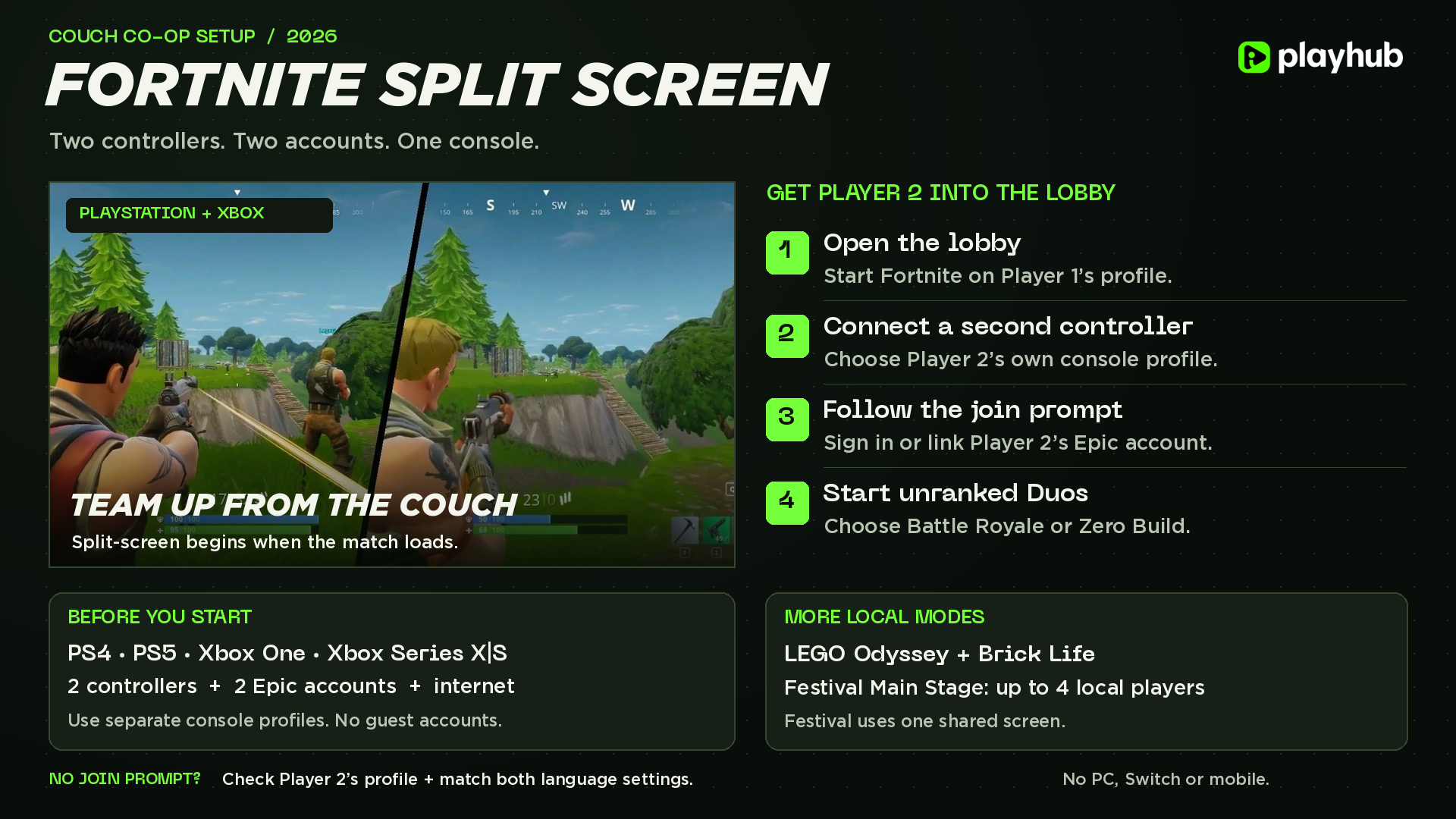
Supported consoles: PS4, PS5, Xbox One, and Xbox Series X|S.
-
You’ll need two controllers and two separate console profiles linked to their own Epic Games accounts.
-
You can play unranked modes - Battle Royale or Zero Build Duos. LEGO Fortnite Odyssey and Brick Life also support couch co-op.
-
If Player 2 can’t join: Check the profile on the second controller and make sure both players use the same Fortnite language setting.
Missed out on some of the exclusive cosmetics available in the past? You can buy Fortnite accounts with the rarest OG skins on Playhub. Best prices, verified sellers, and swift delivery.
How to Turn On Split Screen in Fortnite
In short, to play Fortnite split screen, open the lobby on PlayStation or Xbox, connect a second controller, and sign Player 2 into their own console profile. Once you see both players in the lobby, you can start a game in a supported game mode. The screen actually splits only when the match loads, not in the lobby. Step by step, the process looks like this:
-
Open Fortnite on Player 1’s profile and go to the lobby.
-
Turn on the second controller and select Player 2’s own PlayStation user or Xbox profile. Skip Guest and Quick Play profiles.
-
Follow the join prompt on the second controller. If the lobby shows a button prompt, use Triangle on PlayStation or Y on Xbox. Complete the Epic Games sign-in or account linking if asked.
-
Check that Player 2 appears in the lobby.
-
Start an unranked Battle Royale or Zero Build Duos match - the game splits the screen automatically once the match begins.
If the second controller is active in Player 1’s menus, check which console profile it’s actually assigned to - it’s easy to mix the two up. Epic’s Local Multiplayer guide also shows how to find compatible games after Player 2 joins.
Which Fortnite Modes Support Split Screen?
I think most players are interested in playing unranked Duos if you’re setting this up for the first time, which is luckily available for split-screen. You can freely play it with a regular functional and get your season quests and such done. You can also find modes that work well with split-screen by browsing the Great for Local Multiplayer row in Discover; it usually just appears there once two players are connected.
|
Mode |
Split-screen support |
|---|---|
|
Battle Royale and Zero Build |
Yes, in supported unranked team queues. |
|
LEGO Fortnite Odyssey |
Yes, just add Player 2 in the lobby before loading into a world. |
|
LEGO Fortnite Brick Life |
Yes. Epic lists it separately from Odyssey in its Local Multiplayer guide. |
|
Solos, Ranked, and tournaments |
Not available; I think you wouldn’t want to play ranked on a split-screen anyway. |
|
Creative, limited-time modes, and Save the World |
No, which is weird; why wouldn’t the game let you play PvE together? |
Fortnite Festival Main Stage is an insanely good option if you have more people on the couch. It supports up to four local players on one shared screen on PlayStation or Xbox. Everyone needs a signed-in console profile and Epic account that can access T-rated experiences, which is a hassle to get done, but once you get past the setup stage, it’s super fun to play Temu Guitar Hero together.
Why Is Fortnite Split Screen Not Working?
The point where it fails tells you what to check. If Player 2 never appears in the lobby, start with the controller and account. If they appear but the game won’t let you ready up, check the playlist and account permissions first.
|
What you see |
What to try |
|---|---|
|
No Player 2 prompt |
Reconnect the second controller and assign it to a different signed-in console profile. Return to the lobby and try again with unranked Duos selected. |
|
Player 2 joins, but the mode won’t start |
Check for the Local Players tag and set both accounts to the same Fortnite language. If the game shows a parental lock, have the parent or guardian review Player 2’s access to that experience. |
|
Player 2’s skins or progress are missing |
Check which Epic account is linked to that console profile. Use the account that already holds their Fortnite progress. |
|
The session ends mid-match |
Check the connection. If either local player leaves or disconnects, the split-screen session ends. |
|
It still won’t start in Duos |
Update Fortnite and the console software, then restart the console. If that fails, try Epic’s cache-clearing steps for PlayStation or Xbox. |
If both profiles worked yesterday and the next day they can’t queue for some reason, check Epic’s live issues page; sometimes split-screen bugs out and gets temporarily disabled.
How to Turn Off Split Screen in Fortnite
Back in the lobby, select Player 2’s icon at the top of the screen and choose the option to remove them. That takes the second player out of the party so you can queue alone and turns off split-screen at the same time. Their Locker and progress stay on their Epic account.
Check out other helpful Fortnite guides:
