
PUBG Mobile Codes TL;DR
-
Codes consistently reward you with free stuff, like Challenge Points, Silver Fragments, and cosmetics.
-
Some codes are region-locked, time-limited, or capped after a certain number of redemptions.
-
Redeem codes through PUBG Mobile’s official Redemption Center using your Player ID.
-
Rewards are delivered through the in-game mailbox after successful redemption.
Got your eye on some of the unavailable cosmetics? You can buy a PUBG account with a stacked collection on Playhub - all with the best prices and secure delivery, and with hundreds of options to choose from.
All PUBG Mobile Codes September 2026
The codes list is usually pretty short, and if you grab them right away as they release, you won’t have to waste too much time activating all of them at once. These are the long-running codes currently active:
|
Code |
Reported Reward |
|---|---|
|
CLPOZEZVEG |
20 Challenge Points |
|
CLPOZDZ6PP |
20 Challenge Points |
|
CLPOZCZTVW |
20 Challenge Points |
|
CLPOZBZ6JE |
20 Challenge Points |
|
CLHFZFZ7VE |
20 Challenge Points |
|
PGMB20 |
3,000 Silver Fragments |
|
CMCKZBZBAW |
Sea Breeze Mythic Voucher |
|
PUBGMBRAUC |
PMNC Brazil Championship Outfit |
|
PUBGMBennyMoza1 |
Benny Moza Collection Pack |
|
PUBGMBennyMoza2 |
Benny Moza Collection Pack |
Challenge Point are pretty handy to get, as well as cosmetics, even if they don’t look too good. Once the code is gone, these cosmetics sometimes can’t be received from anywhere else, so you can bag yourself an item almost nobody has a couple of years down the line.
What Rewards Can You Get From PUBG Mobile Codes?
The exact reward the devs distribute depends highly on the event and region. Some codes reveal the reward immediately, while others are mystery codes that reveal their contents only as you redeem them. PUBG Mobile codes have historically provided:
-
Challenge Points
-
Silver Fragments
-
Temporary outfits
-
Character and weapon cosmetics
-
Event tokens
-
Theme tokens
-
Crate coupons
-
Vouchers
-
Creator collection packs
Limited-time outfits are also common. A code can redeem successfully without giving you a permanent item, so check the duration before assuming something has disappeared from your inventory.
How to Redeem PUBG Mobile Codes
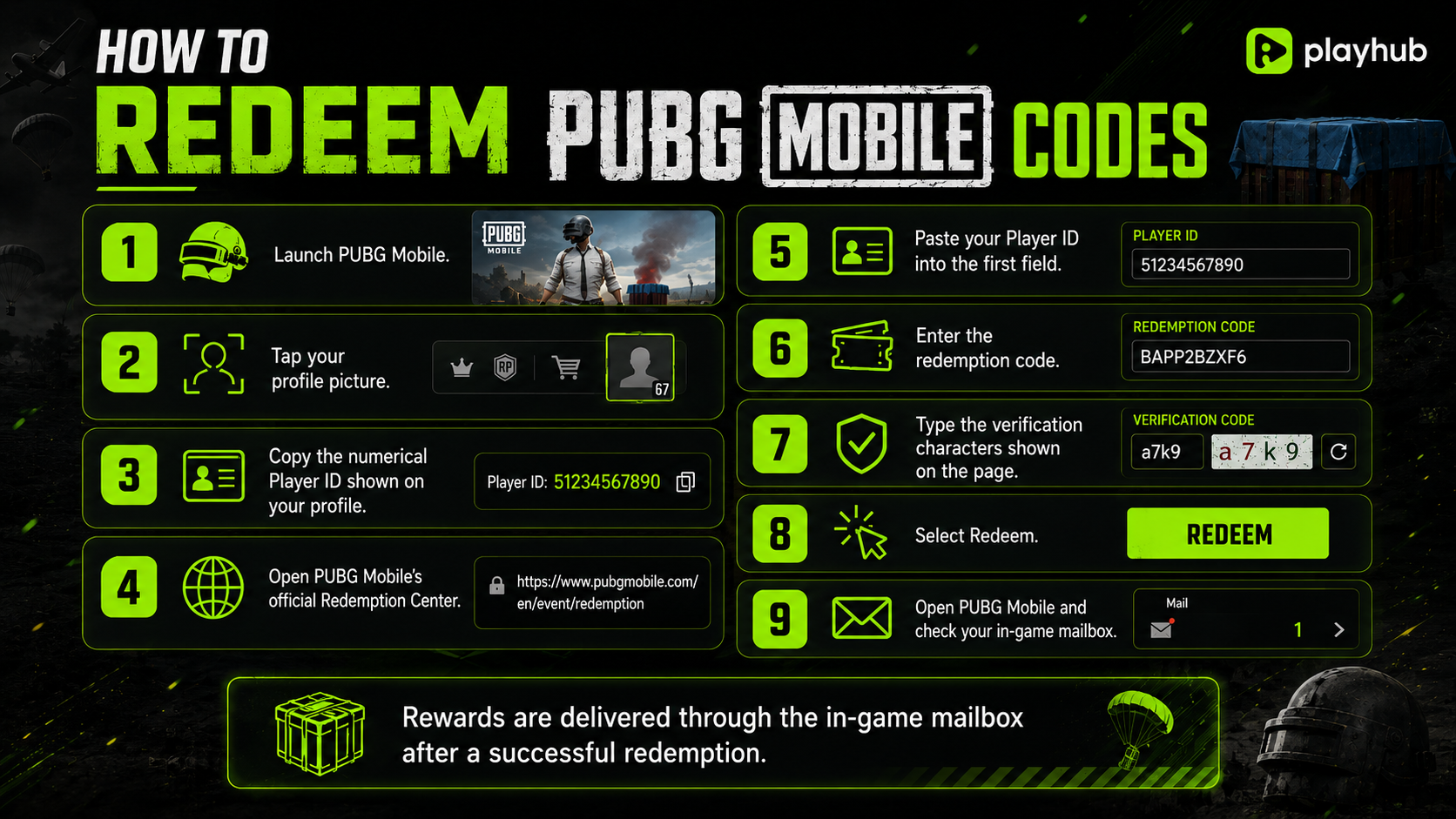
PUBG Mobile codes are redeemed through the official website rather than directly inside the game.
-
Launch PUBG Mobile.
-
Tap your profile picture.
-
Copy the numerical Player ID shown on your profile.
-
Paste your Player ID into the first field.
-
Enter the redemption code.
-
Type the verification characters shown on the page.
-
Select Redeem.
-
Open PUBG Mobile and check your in-game mailbox.
The official page requires three things: your Player ID, the redemption code, and the verification code. It also states that successful rewards are delivered through in-game mail.
I recommend copying both your Player ID and the code. Many PUBG Mobile codes are long strings containing similar-looking letters and numbers, and one wrong character is enough to waste the attempt.
Where to Find Your PUBG Mobile Player ID
-
Open PUBG Mobile and tap your avatar or profile panel from the main lobby.
-
Your Player ID is the numerical account identifier displayed around your username and profile details.
-
Double-check the ID before submitting. The official page uses the same error message for an invalid redemption code or incorrect Player ID, which can make troubleshooting difficult.
Why Is My PUBG Mobile Code Not Working?
When redeeming your code, there’s a whole lot of stuff that could go wrong:
|
Problem |
What It Means |
|---|---|
|
The code expired |
Its promotion or claim window has ended |
|
The usage cap was reached |
Too many players have redeemed it already |
|
It is region-locked |
The code was released for another server |
|
The Player ID is wrong |
The Redemption Center cannot find the account |
|
The code was typed incorrectly |
Capitalization or one character does not match |
|
It was already redeemed |
Most codes only work once per account |
|
The verification code is wrong |
Refresh it and enter the new characters |
|
You made too many attempts |
Wait before trying more codes |
|
The reward has not appeared |
Check your in-game mailbox and restart the game |
Restarting PUBG Mobile can also refresh the mailbox. I’d recommend you pay attention to expiration timers because temporary outfits and event-tied currencies may not appear in the same inventory section as permanently unlocking cosmetics.
Expired PUBG Mobile Codes
PUBG Mobile code lists age badly - they are quick to rotate in and out. The following older codes are expired as of now:
-
#YearofSnake
-
#SpringFestival
-
BAPPZBZXF8
-
BBVNZBZ8M10
-
BBKVZBZ8FW
-
CUMHURIYET2022
-
BBKRZBZBF10
-
99YIL
-
HappyGoldenMoon
-
RollingInMoney
-
HealthAndHappines
-
UKUZBZGWF
-
EBGURMTDOKS
-
BIFOZBZE6Q
-
BTOQZHZ8CQ
-
PUBGMOBILENP
-
BBKTZEZET3
-
DKJU10GTDSM
-
BNBEZBZECU
-
PUBGMPANDA3
-
PUBGMWPGN
-
DABPLAYS
-
F3ITZ
Many were tied to older seasonal celebrations, regional campaigns, creators, and limited events. Current September trackers place them in their expired sections rather than among working codes.
How to Get More PUBG Mobile Codes
New codes are released quite regularly in PUBG and are usually connected to:
-
Regional social campaigns
-
Anniversary events
-
Esports tournaments
-
Livestreams
-
Creator collaborations
-
Brand partnerships
-
Holiday events
-
Official Discord announcements
-
This article
I think that the Chicko campaign is a good example of why regional accounts matter lots in a code hunt. Different official PUBG Mobile pages released separate codes rather than placing one universal list on the main website.