
Rocket League Codes TL;DR
-
9914 and AFA7-7522 unlock limited Player Titles.
-
popcorn gives you the Popcorn Rocket Boost.
-
Codes are redeemed through Settings > Extras > Redeem Code.
-
Rocket League codes do not currently provide free Credits or Rocket Pass Premium.
-
Season 23 creators can also distribute temporary codes for item Drops.
Struggling in your current rank? You can get Rocket League Rank boost at Playhub and reach any rank you want!
All Rocket League Codes September 2026
Historically, code releases are irregular and exclusively reward cosmetics. Here’s a complete list of currently active codes:
|
Code |
Reward |
|---|---|
|
9914 |
Bathroom Code 9914 Player Title |
|
AFA7-7522 |
Completely Lost Player Title |
|
popcorn |
Popcorn Rocket Boost |
Usually, the active list is never huge. Psyonix has never handed out codes too often, but whenever they do, It’s definitely worth grabbing the items you can’t get anywhere else.
What Rewards Can You Get From Rocket League Codes?
There are a bunch of rewards you can possibly get just from redeeming a code, but all of them are cosmetic. Past and current code rewards can get you stuff like:
-
Player Titles
-
Rocket Boosts
-
Decals
-
Wheels
-
Antennas
-
Toppers
-
Player Banners
-
Player Anthems
-
Item Drops
None of the active codes give you Credits, Blueprints, cars, or Rocket Pass Premium. Their value is mainly cosmetic and collectible, especially once an older promotion expires and its reward can no longer be claimed normally.
A change to the system came in Season 23 - it has expanded the system slightly by giving selected Twitch and YouTube creators codes for randomized Drops. Those rewards can range from Sport to Black Market rarity, although availability depends on the creator sharing the code and the promotion still being valid.
How to Redeem Rocket League Codes
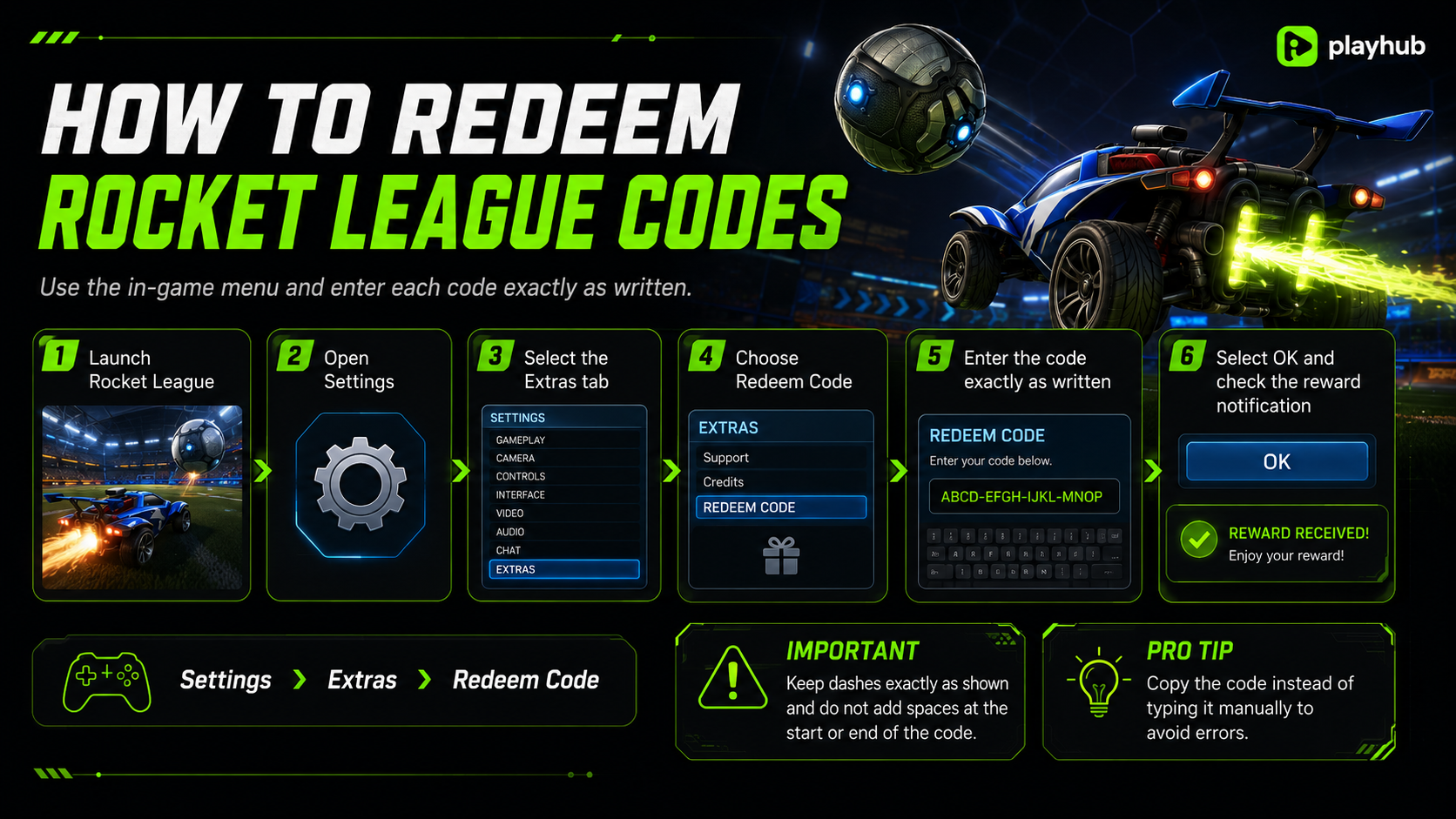
Rocket League codes are redeemed directly through the in-game Settings menu.
-
Launch Rocket League.
-
Open Settings.
-
Select the Extras tab.
-
Choose Redeem Code.
-
Enter the code exactly as written.
-
Select OK.
-
Return to the main menu and check the reward notification.
Epic’s official instructions confirm that codes must preserve their original dashes and should not contain spaces at either end. I recommend always copying code rather than typing it manually. You can spend too much time typing it in manually, getting error codes, and searching for mistakes in the process.
Why Is My Rocket League Code Not Working?
Even though the process is straightforward and simple, there are a few common reasons a code may fail.
|
Problem |
What to Do |
|---|---|
|
The code expired |
Check whether it still appears in the active table |
|
The code was entered incorrectly |
Copy it and preserve all dashes |
|
Extra spaces were included |
Delete spaces before and after the code |
|
You already claimed it |
Codes can generally only be used once per account |
|
You used the wrong redemption page |
Enter public cosmetic codes inside Rocket League |
|
The item is difficult to find |
Check the correct Garage or Profile category |
|
It was a limited creator code |
The code may have expired or reached its redemption limit |
If the redeem code option is missing in your menu, make sure you are opening the right Rocket League’s in-game settings menu:
Settings > Extras > Redeem Code
The Epic Games Launcher has its own redemption system, so it’s easy to mix them up, but that is not where these public Rocket League cosmetic codes should be entered.
Rocket League Redeem Codes vs Creator Codes
Psyonix is giving codes to selected Rocket League creators on Twitch and YouTube throughout the season. Entering one of these codes can award a Drop ranging from Sport to Black Market rarity. Rocket League uses similar names for two systems that do completely different things.
|
Code Type |
Where to Enter It |
Result |
|---|---|---|
|
Settings > Extras > Redeem Code |
Gives a specific cosmetic reward |
|
|
Creator Drop Code |
Settings > Extras > Redeem Code |
Gives an item Drop |
|
Support-A-Creator Code |
Rocket League Item Shop |
Supports a participating creator |
A Support-A-Creator code does not unlock free items. It simply associates eligible Item Shop purchases with a creator.
A Creator Drop code is an actual reward code distributed during supported promotions. Season 23 creator codes belong in the normal Redeem Code menu and can provide Drops up to Black Market rarity.
So, when a creator says “use my code,” check where they tell you to enter it. The Item Shop version supports the creator. The Extras-menu version gives you something.
Expired Rocket League Codes
Knowing what was rewarded previously lets you recognize the pattern of what might be coming next. The following codes were previously active but are now expired:
|
Code |
Previous Reward |
|---|---|
|
RocketLeagueLive |
RLCS Theme Player Anthem, Hustle Brows Topper, Aero Mage: Hatch Wheels, Neon Runner Banner |
|
SARPBC |
SARPBC-10 Antenna and Moai Antenna |
|
bekind |
VCR Topper |
|
couchpotato |
Couch-Potato Player Title |
|
truffleshuffle |
The Goonies Octane Decal |
|
shazam |
Shazam Octane Decal and Wheels |
|
wwe18 |
Two random WWE items |
|
wrestlemania |
Two random WWE items |
|
wwedads |
Two random WWE items |
|
rlbirthday |
Two random WWE items |
|
rlnitro |
Nitro Circus Antenna and Breakout Decal |
As you can see, the legacy rewards included licensed decals, WWE cosmetics, antennas, wheels, banners, a Player Anthem, and several Player Titles. Current September lists mark all of the codes above as inactive.
Some old code pages still list rlnitro, shazam, or RocketLeagueLive as active because they have not been updated since flip resets were considered witchcraft. They are not part of the current working list.
How to Find New Rocket League Codes
Evidently, Rocket League codes do not follow a fixed release schedule. Some of the best places to check are:
-
Official Rocket League news posts
-
Rocket League social accounts
-
RLCS broadcasts
-
Twitch and YouTube creator communities
-
TikTok reward campaigns
-
Collaboration announcements
-
Major season launches
-
This article
I would pay the most attention to new announcements during new seasons, esports events, and major crossovers. Those are the periods when Psyonix is most likely to distribute Drops, login rewards, or limited promotional codes.
When no codes are active, Twitch Drops are your best alternative. Link your Epic Games account to Twitch, watch a Drops-enabled RLCS stream, and rewards unlock automatically. TikTok campaigns occasionally distribute limited cosmetic codes as well - follow the official Rocket League TikTok and check bio links during event windows.