
FC 27 Best Settings TL;DR
-
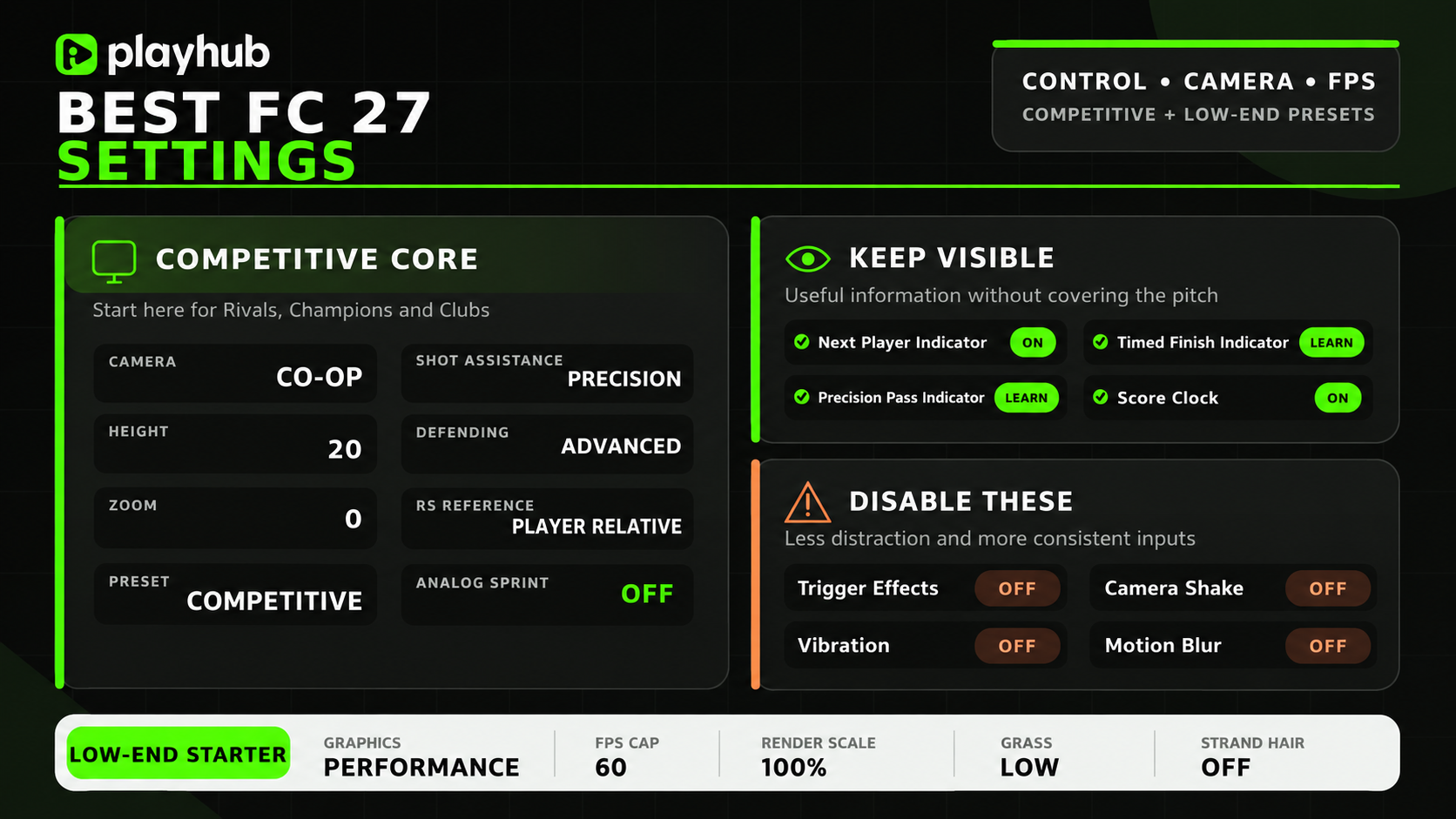
Use Co-Op camera with 20 Height and 0 Zoom.
-
Start with the Competitive controller preset for online modes.
-
Set shooting to Precision and through passes to Semi.
-
Use Advanced Defending with Player Relative right-stick switching.
-
Disable Analog Sprint, Trigger Effects, and Camera Shake.
-
PC players should prioritize stable FPS over Ultra visuals.
Still haven’t bought FC 27, or starting on another platform? You can get an FC 27 account on Playhub, with competitive prices and quick delivery from verified sellers.
Best FC 27 Controller Settings
FC 27’s changes give manual inputs more weight than FC 26. Bad switching therefore gets punished much faster this year, so you need a good input preset that let’s you play as precisely as possible. The Competitive preset matches the assists enforced across ranked modes; good players also avoid practicing with help that disappears during Champions or Rivals.
|
Controller Setting |
Recommended |
|---|---|
|
Preset |
Competitive |
|
FC Trainer |
Hide |
|
Shot Assistance |
Precision |
|
Timed Finishing |
On |
|
Ground Pass Assistance |
Assisted |
|
Through Pass Assistance |
Semi |
|
Lobbed Through Pass |
Semi |
|
Cross Assistance |
Assisted |
|
Lob Pass Assistance |
Assisted |
|
Pass Receiver Lock |
Late |
|
Precision Pass Sensitivity |
Normal |
|
Clearance Assistance |
Directional |
|
Defending |
Advanced Defending |
|
Professional Fouls |
On |
|
Pass Block Assistance |
On |
|
Auto Switching |
Air Balls and Loose Balls |
|
Auto Switching Move Assistance |
None |
|
Right Stick Switching |
Classic |
|
Right Stick Switching Reference |
Player Relative |
|
Right Stick Switching Sensitivity |
4 |
|
Next Player Switching |
Closest to Ball |
|
Reaction Time Calibration |
Off |
|
Player Lock |
On |
|
Icon Switching |
Off |
|
Simplified Skill Moves |
Off |
|
Analog Sprint |
Off |
|
Trigger Effect |
Off |
|
User Vibration |
Off for competitive play |
These settings make inputs feel predictable and controlled, which matters a lot in online play. The player should know where a pass goes before pressing the button.
Advanced Defending is basically a must-have this time around. It allows shoulder challenges, seal-outs, and intentional tackle choices you’ll just have to do to perform best. EA confirms that Competitive gameplay reduces automatic tackles and AI interception reach in its official FC 27 Gameplay Deep Dive. Manually controlled defenders receive stronger jockey speed and tackle range, making precise switching and positioning more important than before.
Best FC 27 Camera Settings
Co-Op preset remains the best competitive camera setting. Its wider view profile impacts the gameplay even more with FC 27’s smarter runs.
|
Camera Setting |
Recommended |
|---|---|
|
Online 11v11 Camera |
Co-Op |
|
Offline 11v11 Camera |
Co-Op |
|
Player Career Camera |
Co-Op |
|
Clubs 11v11 Camera |
Co-Op |
|
Rush Camera |
Rush Tactical |
|
The Grounds Rush Camera |
Rush Tactical |
|
The Grounds Street Football Camera |
The Grounds Pro Club |
|
Be-A-Goalkeeper Camera |
Co-Op |
|
Custom Camera Settings |
Custom |
|
Height |
20 |
|
Zoom |
0 to 4 |
|
Horizontal Camera Sensitivity |
20 |
|
Vertical Camera Sensitivity |
20 |
|
Power Shot Zoom |
Off |
|
Camera Shake Visuals |
Off |
|
Inverse Camera Controls |
Off |
Height 20 shows the largest useful pitch area, and Zoom 0 works well on desktop monitors. Players sitting farther from a TV may need additional zoom, unless you have an unnecessarily huge one. I prefer stuff like extra power shot zoom and camera shake to be disabled because it adds nothing to the gameplay while making the actual important thing harder to track. But they look cool, so you can use them if you like. Here’s the recommended zoom by display size table:
|
Display Size |
Recommended Zoom |
|---|---|
|
21 to 27-inch monitor |
0 |
|
32 to 43-inch display |
3 to 5 |
|
50-inch television or larger |
10 to 20 |
Best FC 27 Competitive Settings
Competitive settings should prioritize having excellent control over your character and precise controls. Here’s a profile that works perfectly in Rivals, Champions, and Clubs:
|
Setting |
Recommended |
|---|---|
|
Gameplay Preset |
Competitive |
|
Contextual Agile Dribbling |
Off |
|
Auto Clearances |
Off |
|
Auto Flair Pass |
Off |
|
Auto Shots |
Off |
|
Assisted Headers |
Off |
|
Jockey |
Manual |
|
Defending |
Advanced |
|
Auto Switching |
Air Balls and Loose Balls |
|
Shot Assistance |
Precision |
|
Through Pass Assistance |
Semi |
Some of the options can feel extra harsh after Assisted gameplay but you have to familiarize yourself with them if comp is what you’re striving for.
Best FC 27 Career Mode Settings
Career Mode benefits from a different setup than any other mode. Authentic Gameplay creates a more realistic feeling movement, stronger fatigue effects, and more fouls. Competitive is better for anyone wanting Ultimate Team-style responsiveness.
|
Career Setting |
Recommended |
|---|---|
|
Gameplay Type |
Authentic |
|
Match Length |
6 to 8 minutes |
|
Difficulty |
World Class or Legendary |
|
Competitor Mode |
Off |
|
Player-Based Difficulty |
On |
|
Injury Frequency |
Default |
|
Negotiation Strictness |
Strict |
|
Camera |
Co-Op or Tele Broadcast |
|
Controller Preset |
Custom |
Assisted Shooting can feel more natural across long seasons. Tele Broadcast also creates a better television-style presentation that goes well with the authentic preset. Extra flair effects like weather, form, and fatigue can also meaningfully affect how matches feel.
Best FC 27 PC Graphics Settings
FC 27 has Performance and Balanced graphics modes. Those options look impressive, but competitive matches need stable frame times. A locked 120 FPS feels better than unstable movement between 160 and 80.
|
Graphics Setting |
Recommended |
|---|---|
|
Graphics Preset |
Performance or Balanced |
|
Display Mode |
Fullscreen |
|
Resolution |
Native |
|
Refresh Rate |
Highest available |
|
Render Scale |
100% |
|
Frame Rate Limit |
Stable monitor target |
|
V-Sync |
Off with G-Sync or FreeSync |
|
Dynamic Resolution Scaling |
Off initially |
|
Rendering Quality |
Medium |
|
Grass Quality |
Low |
|
Crowd Quality |
Low |
|
Cloth Quality |
Medium |
|
Lighting Quality |
Low |
|
Ambient Occlusion |
Low or Off |
|
Effects Quality |
Medium |
|
Strand-Based Hair |
Off |
|
3D Goal Nets |
On |
|
Motion Blur |
Off |
|
Cutscene Performance |
Half frame rate or preference |
|
Enhanced Ultra Visuals |
Off |
Native resolution and 100% render scale keep players and environments just sharp enough. Dynamic Resolution should be off unless your PC struggles with running the game.
Best FC 27 Settings for High-End PCs
High-end systems should target the monitor’s refresh rate first. A 144Hz display benefits from a stable 144 FPS target. Ultra textures can then be added if VRAM remains comfortable.
Enhanced Ultra Visuals should stay disabled for competitive modes. They are better suited to Career Mode and screenshots. Increased detail does not improve input response.
The High and Ultra profiles have different targets. High Performance targets 1080p around 80 FPS on an RTX 3060-class system. Ultra Performance targets 1440p at 120 FPS on RTX 4070-class hardware.
Best FC 27 Settings for Low-End PCs
Older systems should begin with the Performance preset. The goal is stable 60 FPS during gameplay. Replays and cutscenes can run at 30 FPS.
|
Low-End Setting |
Recommended |
|---|---|
|
Resolution |
1920x1080 or 1280x720 |
|
Graphics Preset |
Performance |
|
Frame Rate Limit |
60 FPS |
|
Render Scale |
100%, then reduce if needed |
|
Rendering Quality |
Low |
|
Grass Quality |
Low |
|
Crowd Quality |
Low |
|
Cloth Quality |
Low |
|
Lighting Quality |
Low |
|
Ambient Occlusion |
Off |
|
Effects Quality |
Low |
|
Strand-Based Hair |
Off |
|
Motion Blur |
Off |
|
Dynamic Resolution |
On only for severe drops |
|
Cutscene Performance |
Half frame rate |
The minimum PC target uses a GTX 1050 Ti or RX 570. EA pairs that hardware with 720p and Low settings. The recommended 1080p target uses a GTX 1660 or RX 5600 XT.
Players should install FC 27 on an SSD if possible. Background overlays should also be closed during testing. Discord, recording software, and browser tabs can create extra CPU load.
Best FC 27 Keyboard Settings
FC 27 adds redesigned WASD and Arrow Keys layouts. WASD feels more natural for players coming from other PC games. Arrow Keys remain available for longtime keyboard players.
|
Keyboard Option |
Recommended |
|---|---|
|
Movement Layout |
WASD |
|
Sprint |
Shift |
|
Player Switch |
Q or comfortable nearby key |
|
Through Pass |
W or preference |
|
Shoot |
D or preference |
|
Cross |
A or preference |
|
Ground Pass |
S or preference |
|
Tactical Shortcuts |
Nearby number keys |
The exact binds remain personal. Important actions should stay near the movement keys. Tactical changes should never require reaching across the keyboard.
Controller remains easier for most players. Analog movement provides more directional control. However, the new layouts make keyboard play less awkward than FC 26.
Best FC 27 Visual and Audio Settings
Visual indicators should communicate useful actions to you without covering the pitch. Most presentation effects can be reduced during competitive play.
|
Visual Setting |
Recommended |
|---|---|
|
Next Player Switch Indicator |
On |
|
Timed Finishing Indicator |
On while learning |
|
Precision Pass Indicator |
On while learning |
|
FC Trainer |
Hide after learning controls |
|
Score Clock |
On |
|
Player Indicator |
On |
|
Camera Shake |
Off |
The Next Player Switch Indicator should always remain clearly visible since that information helps prepare movement before the switch completes. Timed Finishing and Precision indicators can be disabled after the timing becomes natural to you. Keeping the entire FC Trainer UI visible creates unnecessary clutter. Clubs players also need a voice chat clearly audible to cooperate better - otherwise, you’re leaving team performance on the table.
|
Audio Setting |
Recommended |
|---|---|
|
Master Volume |
Preference |
|
Sound Effects |
80 to 100 |
|
Stadium Ambience |
50 to 70 |
|
Commentary |
Preference |
|
Menu Music |
10 to 30 |
|
Voice Chat |
On for Clubs |
|
Controller Speaker |
Off |
Check out other helpful FC 27 articles here: