
We have waited more than 13 years for this, and GTA 6 graphics exceed any expectations, especially considering its open-world ambitions and Rockstar’s infamous attention to detail. But how exactly do GTA 6 graphics compare to its direct predecessor - GTA 5? That’s what we’re gonna figure out today. I made a video and a comparison tool to see how GTA graphics have evolved in more than a decade and how, once again, Rockstar revolutionized real-time rendering:
If you’re already excited and can’t wait to play GTA 6, then you should totally check out accounts for sale on PlayHub. Browse our catalog, buy an account, and jump right into the game on day one!
GTA 6 vs GTA 5 Graphics Breakdown
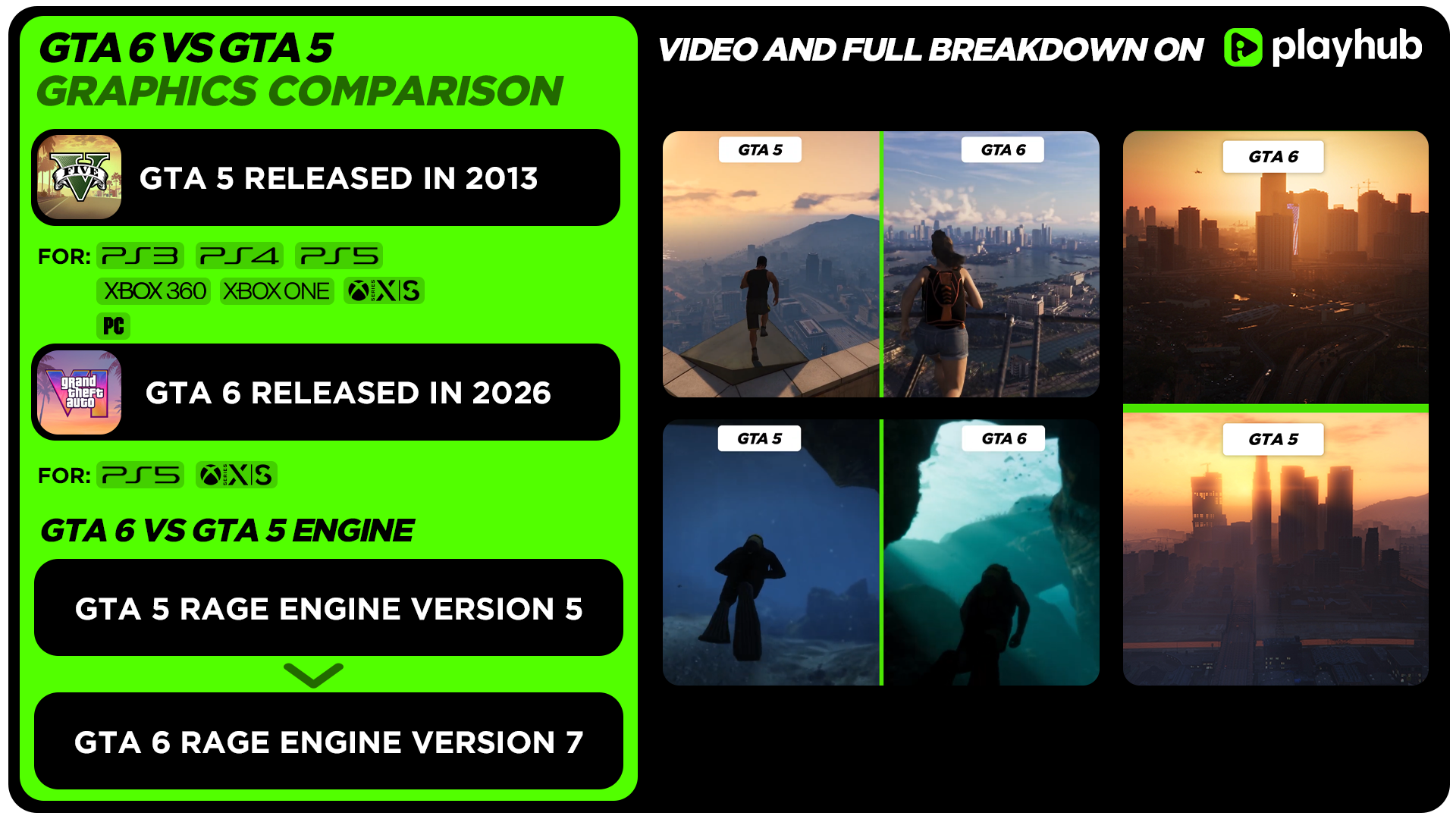
As you can see in the video, the difference between GTA 5, which first came out in 2013, and GTA 6 is immense. At first glance, you may think it’s not that insane, but once you pay attention to details, it becomes clear that Rockstar is pushing current-gen hardware (in this case, all the footage was captured on the base PS5 console) to its limits. To make it more fair, I decided to compare the most advanced version of GTA 5 - the Enhanced version on PC with maxed-out settings and ray tracing enabled. Once we will dive deeper into the graphics analysis, it becomes obvious that Rockstar has tested a lot of visual improvements and optimization solutions for GTA 6 in the enhanced version of GTA 5, while also being the direct evolution of the RDR 2 version of the RAGE engine. So let’s not waste any more time and analyze all aspects of GTA 6 graphics, from resolution and FPS to impressive hair physics and ray tracing features.
GTA 6 vs GTA 5 Resolution
Let’s start with the basics: how the resolution is compared between GTA 6 and GTA 5. Keeping in mind that GTA 5 came a long way from its initial launch on PS3 and XBOX 360, while also being available on a wide range of hardware, including PC with two versions (Legacy and Enhanced), 8th gen consoles (PS4 and XBOX One), as well as 9th gen (PS5 and XBOX Series X/S), comparing resolutions can be tricky, but from all that we know for sure is that on the base PS5 the game is running at native 1440p, according to Digital Foundry with no dynamic resolution. It’s locked at 2K, which is impressive considering most games tend to run even below 1080p while using some upscaling like FSR, which often makes the image look blurry and feature artifacts. But how does it compare to GTA 5? Here’s a table of how GTA 6 resolution compares to all GTA 5 versions:
|
Game Version |
GTA 5 7th Gen (PS3 and XBOX 360) |
GTA 5 Enhanced (PS4, XBOX One, PC (Legacy)) |
GTA 5 Expanded & Enhanced (PS5, XBOX Series S/X, PC) |
GTA 6 |
|---|---|---|---|---|
|
Base Resolution & FPS |
1280x720 up to 30 FPS (720p, both consoles) |
PS4, XBOX One: 1920x1080 up to 30 FPS (1080p, both consoles) PC - Unlimited |
PS5, XBOX Series X: Fidelity Mode - 3840 × 2160 up to 30 FPS (4K) Performance Mode - Upscaled to 4K at 60 FPS without ray tracing Performance RT Mode - Upscaled to 4K (around 1440p internal) at 60 FPS with ray tracing. XBOX Series S: Fidelity Mode - Upscaled 4K resolution at 30 FPS with ray tracing. Performance Mode - Native 1080p resolution at 60 FPS. PC - Unlimited |
PS5, XBOX Series X: 1440p at 30 FPS (both consoles) PS5 Pro: Up to 4K at 30 FPS (Unconfirmed) XBOX Series S: 1080p at 30 FPS (Unconfirmed) |
|
Anti-Aliasing/Upscaling Used |
Post Processing Anti-Aliasing |
FXAA |
TAA |
TAA |
You may have noticed that the resolution and frame rate of GTA 5 Expanded & Enhanced are higher than GTA 6, but that’s because the graphics, fidelity, and details are much higher in GTA 6 than in the game that was originally designed for PS3 and XBOX 360 with some visual enhancements. That’s totally justified in my opinion.
GTA 6 vs GTA 5 Characters Comparison

The most impressive upgrade from GTA 5, in my opinion, is the character rendering, especially hair physics. For its time, characters in GTA 5 were solid-looking, but in 2026 you can see how blocky and low-detail they are. Compared to GTA 6, the characters of its predecessor feature low-resolution textures with primitive shading, primitive subsurface scattering for main characters only, and no Physically Based Rendering materials. Skin just looks unnatural and flat. GTA 6 overcomes all these issues, featuring realistic textures with PBR and subsurface scattering. You can see how accurate the translucency of human skin looks with granular details like visible pores and sweat. The expressions and movements of characters in GTA 6 are better animated and more nuanced than the ones in GTA 5. Clothes also look much better with high-quality PBR materials and physics. But in my opinion, the main standout is hair rendering. That’s something we rarely see in video games, and GTA 6 does it the best. This is the strand-based hair solution instead of simple card textures that were used in GTA 5. The difference is that strand-based hair models and renders individual hair fibers instead of using solid textured polygon sheets ("hair cards"). More and more modern games use this system now, like Resident Evil Requiem and even some older ones like Rise of the Tomb Raider from 2015 that used the AMD TressFX solution, but GTA 6 hair mogges them all. No more stiff hair, especially, it’ll be useful in upcoming Online mode and RP with character creation. Now we’re talking business. Here’s some character comparisons, and also there’s no better way to compare two games than the returning character from GTA Online in GTA 6 - Valentina.

GTA 6 vs GTA 5 Reflections Comparison

Keeping in mind the limitations of PS3 and XBOX 360, GTA 5 featured low-resolution cube map reflections. This cubemap is generated in real time at each frame, but the texture was only 128x128, which is why, if you look closely, the reflections in the game look blurry, aliased, and just not up to 2026 standards. If you’re interested in a more detailed GTA 5 graphics analysis study, then you should check out this very detailed article from Adrian Courrèges. Cube maps were the main reflection solution for GTA 5 up until the release of the Expanded & Enhanced version, which introduced ray-traced reflections. Compared to cube maps, ray-traced reflections show accurate and perspective-correct details of the world around you on glossy surfaces. Ray tracing was used for most surfaces, but water still uses reflection maps, and mirrors use planar reflections instead. The difference between ray-traced and planar reflections is that planar ones can only be used on a single flat surface, which works perfectly for the mirror, but is suboptimal for a huge open-world game like GTA 5. Also, planar reflections are more expensive in terms of resources than ray-traced ones. But keep in mind that GTA 5 was originally not designed with such advanced tech like ray tracing and PBR materials, so some reflections can look overly sharp on some surfaces. This is something that GTA 6 fixes as well by using PBR materials with hardware ray-tracing everywhere that exhibit accurate roughness and specularity. You can notice realistic imperfections like scratches, dust, and cars with a semi-dull finish just don’t look like they’re made out of a mirror. Everything just looks good and lifelike in GTA 6. Slightly rougher materials look correct instead of everything looking like a plain mirror. But there are some caveats. Because how ambitious GTA 6 is, there are some limitations to reflections, like the lower resolution of the reflections you can notice in some shots. Don’t get me wrong, they still look very high-quality, and this is miles ahead of basic cube maps we’ve seen in the older versions of GTA 5, but if you look closely, the limitations can be seen. But ray tracing is not the only reflection technique that has been used in GTA 6. Screen space reflections can also be seen, especially on the water and big puddles. We’ve already seen SSR used in Red Dead Redemption 2, and it seems like it was used in GTA 6 as well as a fallback for more detailed reflections. The drawback is, of course, that this method only reflects what is visible on the screen, so if you move the camera down, most reflections will disappear.
GTA 6 vs GTA 5 Lighting Comparison & Global Illumination

GTA 5 uses a deferred rendering pipeline, combining pre-baked lighting, dynamic light sources, and other clever tricks. Once again, it looked good for PS3 and XBOX 360 in 2013, but it looks really flat and primitive now. Shadowed areas looked overly bright with unnatural lighting, and the surfaces didn’t project any colors when the light (sun and artificial light sources) pointed directly at it. GTA 5 Enhanced fixed this issue with a ray-traced GI solution, featuring realistic indirect diffuse lighting, light bounce, and shading. Brightly lit surfaces finally light up a shadowed area realistically, bouncing their surface color into the darkness. If you’re curious about how it affects the game in more detail, then you should check out my GTA 5 Enhanced Best Settings article with an interactive tool to compare all settings, including ray tracing off and on changes. When it comes to lighting in GTA 6, once again, it’s on another level. The RTGI and lighting solutions look similar to the ones used in GTA 5 Enhanced, but because of the game's high-quality assets and the sunny setting of Vice City, which is the in-game version of Miami, it is perfect to showcase robust global illumination and bounce lighting. Indirect diffuse lighting is one of the highest quality I’ve seen in any game. The rendition of the world of GTA 6 just feels alive and realistic, while also preventing the glowy, unnatural appearance of the basic lighting solutions we’ve seen in GTA 5 at first. The details of the assets, characters, and the lighting - this is where the biggest differences between GTA 5 and GTA 6 are visible.
GTA 6 vs GTA 5 Shadows Comparison

GTA 5 uses cascaded shadow maps extensively with deferred rendering to create dynamic and static shadows. Shadows either look aliased and low-resolution on consoles or low settings on PC, or unnaturally sharp. There are some tricks used in the PC version on higher settings to soften shadows and create the illusion of a variable penumbra (when the fuzzy outer edge (the penumbra) changes in width and blurriness depending on how far an object is from the light source and the surface it casts a shadow on). The enhanced PC version introduced ray-traced sun shadows that simulate realistic shadows with variable penumbra more accurately, but with GTA 5’s simple geometry, these shadows don’t stand out as much as they could. Interestingly, this is the first time we see a downgrade in GTA 6 compared to GTA 5 Enhanced in this aspect. Instead of using ray-traced shadows, GTA 6 seems to be going back to using shadow maps, although at a much higher resolution and with simulation of variable penumbra. This solution looks very similar to the one Rockstar used in RDR 2 back in 2018, but with shadow maps come limitations like visible cascades and artifacts. Screen space shadows for smaller objects like rocks and litter are being used as well.
GTA 6 vs GTA 5 Environment Details Comparison

Environmental details are where GTA 6 stands out against GTA 5. This is a natural evolution of the immense work Rockstar did in RDR 2. The amount of objects and geometry is dense. You can see much farther in the distance in GTA 6, while the world retains much more detail compared to GTA 5. You can also spot a lot of realistic volumetric effects like the fog and clouds. But it’s not the only highlight. For example, by looking closely, you can see the water droplets while driving the Jetski, condensation on the bottles, and realistic water physics. Granular details like these make all the difference, and that’s something that RDR 2 is also infamous for. You can see detailed destruction of the objects and the evolution of Rockstar’s Euphoria physics engine that was used in GTA 4, RDR, GTA 5, RDR 2, and GTA 6 as well. NPC bodies react realistically to bullet impacts and car crashes. Everything just looks next level. This is something that GTA 5 was heavily criticized for: downgrades in physics and NPC interaction, for lack of enterable interiors compared to GTA 4, and this is something that GTA 6 seems to be fixing all along.
GTA 6 vs GTA 5 Vehicles Comparison

Cars are another standout in GTA 6. Many of them are back from GTA 5; in comparison to GTA 6 they look not as bad as the characters, but if you look closely, you can see a lot of improvements. For example, a lot of elements that were a simple texture back then are now fully modeled 3d objects. In my opinion, the main ones are the headlights. In GTA 5, they look painted, like a simple texture (which it is, many cars feature fully opaque headlights), but in GTA 6 they’re semi-transparent, and you can see all the geometry underneath. The effects are also improved. When throwing a Molotov, you can see the sparks coming out of the headlights instead of them just breaking with almost no effects whatsoever (or not breaking at all in some cases).
How RAGE Engine Evolved in GTA 6

Some people say that the comparison of GTA 5 to GTA 6 is not really fair, and there’s some truth to it. At its core, GTA 5 is still the game from 2013 that was developed with the limitations of PS3 and XBOX 360 in mind and retaining a lot of characteristics of GTA 4 and the RDR version of the engine. Over the years, there were lots of rereleases and enhancements, but the character models and the geometry of the world stayed the same. No amount of fancy ray tracing and effects can hide it. RDR 2 was the next big step in the evolution, moving to PBR rendering, while introducing volumetric effects and clouds (that will also be used in GTA 6) and revolutionizing visuals for PS4 and XBOX One back in 2018. You may have seen countless of videos comparing modern games to RDR 2, and in many cases the game from 2018 still looks better than new games that come out nowadays. This is something that Rockstar will repeat with GTA 6. Gamers will talk and compare all the details and graphics of GTA 6 to other games and still find something new years after the release. But for now, thanks for checking out this guide, and I hope to see you soon on my blog!
Also check out other GTA 6 articles: